
Key Takeaways
- Globally, the number of hotspots reached 549 million by the end of 2022.
- The United States, France, and the UK have the most hotspots.
- Most people use public Wi-Fi for its convenience and widespread availability.
- Using a VPN is the best way to stay safe on public Wi-Fi because it encrypts all your traffic.
Public Wi-Fi connects world travelers, urbanites, and individuals without residential internet, making it a crucial part of everyday life. Public Wi-Fi supports economic development, education, and interconnectedness. It has seamlessly merged the physical and online worlds.
To understand how indispensable public Wi-Fi is to modern society, we must examine its role and impact using detailed statistics on usage, reach, and broader implications.
What is Public Wi-Fi?
The global presence of public Wi-Fi is extensive and continues to grow. The total number of hotspots is expected to reach 3.15 billion by 2030.
How extensive is the global presence of public WiFi?
Public WiFi is available worldwide, with hundreds of millions of hotspots, but coverage and quality vary by country and city. It has grown from 362 million hotspots in 2019 to 549 million by 2022, reflecting the worldwide drive toward constant connectivity and the bridging of the digital divide. The ever-growing expansion offers access to information and communication, particularly in areas with limited home internet, and plays an indispensable part in daily life and global progress.
Which countries have the most public WiFi hotspots?
The United States, France, and the UK have the most public Wi-Fi hotspots, with France currently leading the way.
Country | Total Hotspots | Top Cities |
Russia | 276,439 | Moscow (36,708) |
Ukraine | 121,329 | Kyiv (16,646) |
Spain | 93,225 | Madrid (7,437) |
Italy | 72,680 | Rome (4,842) |
Portugal | 61,403 | Lisbon (7,186) |
France | 57,381 | Paris (10,663) |
Germany | 56,067 | Hamburg (1,305) |
United Kingdom | 53,077 | London (12,520) |
Romania | 28,297 | Bucharest (3,717) |
Bulgaria | 26,957 | Sofia (4,443) |
United States | 409,185 | California |
Mexico | 108,088 | Mexico City (21,500) |
Brazil | 364,966 | São Paulo (17,600) |
Argentina | 56,357 | Buenos Aires (1,200) |
Columbia | 56,038 | Bogotá (11,422) |
Canada | 57,173 | Toronto (250) |
Dominican Republic | 15,004 | Santo Domingo (1,500) |
Costa Rica | 5,586 | San José |
Ecuador | 29,916 | Guayaquil (4,754) |
Peru | 16,412 | Lima (1,700) |
Australia | 17,328 | Sydney (3,173) |
New Zealand | 4,560 | Auckland (680) |
The United Arab Emirates | 68,930 | Dubai (23,700) |
South Korea | 55,005 | Seaol (10,000) |
Algeria | 97,776 | Algiers (3,616) |
Japan | 92,000 | Toyko |
China | 17,328 | Shanghai (2,744) |
Egypt | 361,738 | Cairo |
South Africa | 11,422 | Cape Town (1,500) |
Nigeria | 3,783 | Lagos (200) |
Which countries have the fastest public WiFi?
- Singapore: It is often reported that Singapore has the fastest public internet with speeds up to or exceeding 372 Mbps.
- United Arab Emirates: The UAE's average public WiFi speed is around 318 Mbps.
- Hong Kong: The average public WiFi speed in Hong Kong is approximately 270 Mbps.
- France: The average speed of public WiFi in France is 240 Mbps.
- Iceland: The average public WiFi speed is 260 Mbps.
Why do people use public WiFi?
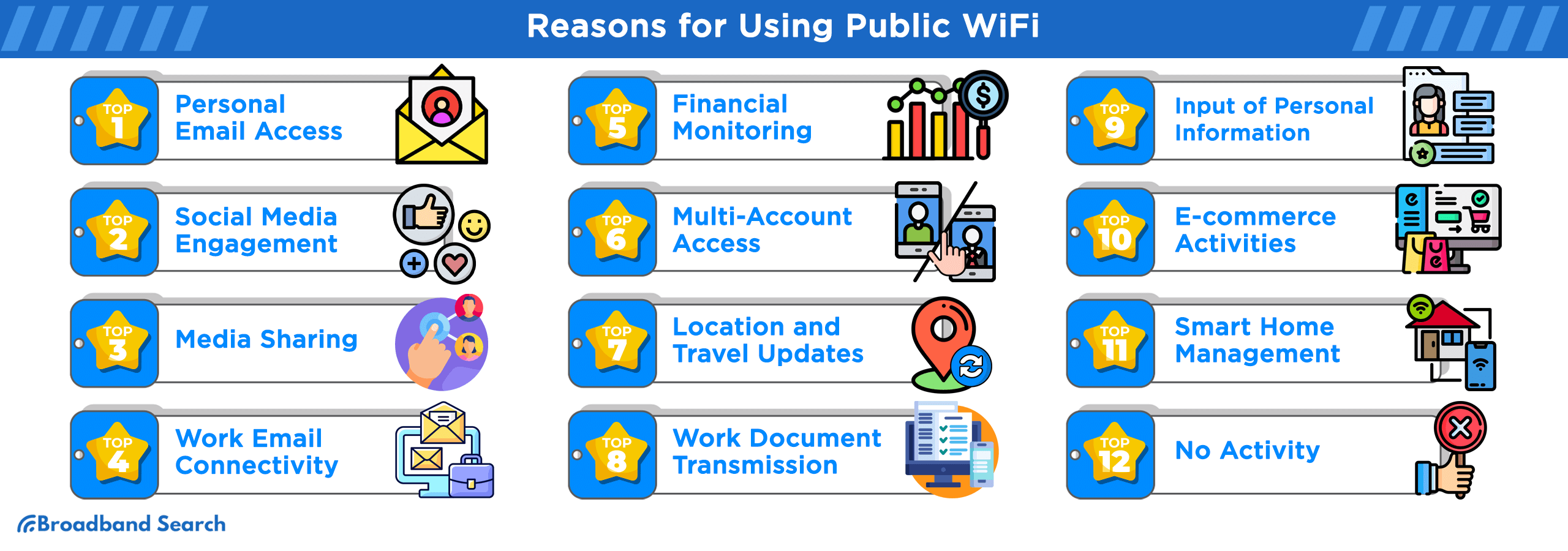
Convenience is the biggest reason people use Public WiFi networks, but there are many other reasons. Whether it's for remote work, travel, or saving mobile data, these networks are essential to our hyperconnected world. Here is how people are using public Wi-Fi networks:
- Personal Email Access (59%)
- Social Media Engagement (56%)
- Media Sharing (44%)
- Work Email Connectivity (26%)
- Financial Monitoring (25%)
- Multi-Account Access (22%)
- Location and Travel Updates (22%)
- Work Document Transmission (19%)
- Input of Personal Information (17%)
- E-commerce Activities (16%)
- Smart Home Management (9%)
- No Activity (13%)
How secure is public WiFi?
Public WiFi is risky because unsecured networks allow hackers to steal personal data. You can take protective measures to avoid data interception and malware, but it is still critical that you understand the specific dangers of public WiFi.
Is it safe to use public WiFi?
According to a Forbes report, public WiFi is generally not safe for sensitive activities because these networks are inherently vulnerable to cyberattacks. Hackers can use public hotspots in places like airports and restaurants to steal personal data, plant malware, or intercept communications. A 2023 Forbes Advisor survey found that 40% of travelers had their security compromised while using public WiFi.
- Completely Safe: 23% of respondents believe public WiFi networks are completely secure.
- Somewhat Safe: 43% feel that these networks are somewhat safe.
- Somewhat Unsafe: 20% of people think using public WiFi can be somewhat risky.
- Not Sure: 9% are uncertain about the safety of public WiFi networks.
- Not Safe At All: 5% firmly believe that public WiFi networks are not safe at all.
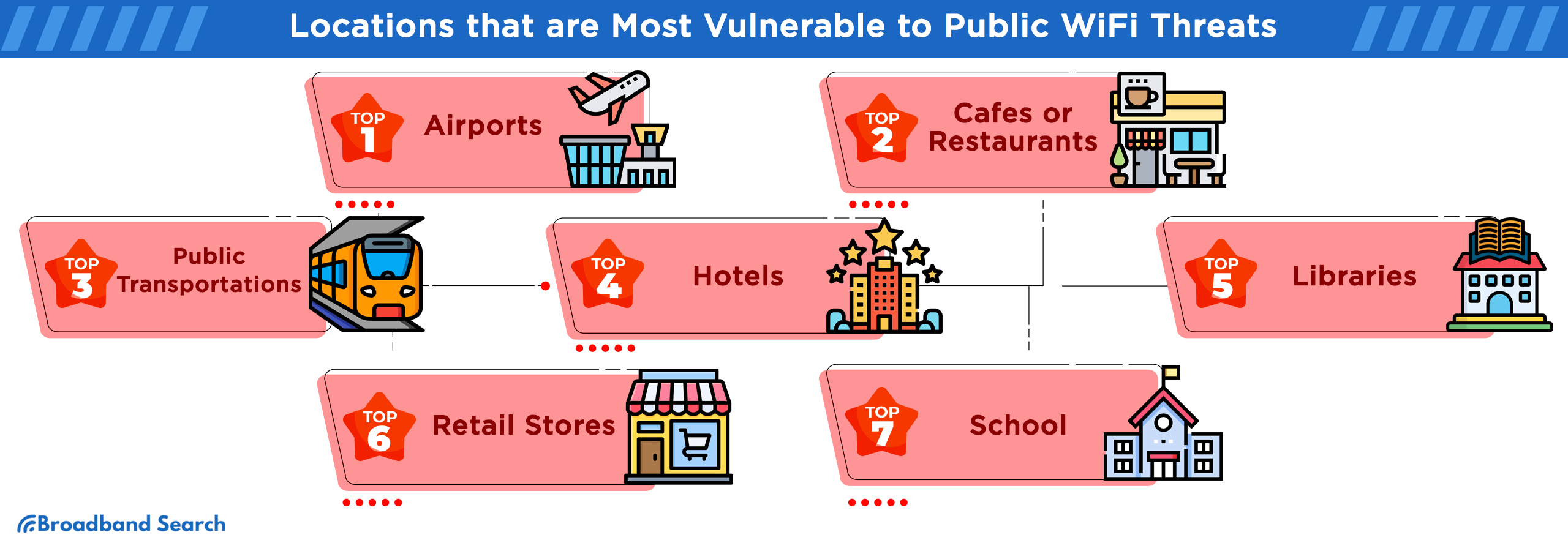
Where do public WiFi users feel most at risk of security threats?
Crowded public places are risky when using public WiFi. The danger increases because there are more users, and sensitive information is more likely to be accessed, making the network a lucrative target for hackers.
- Airports (46%)
- Cafes or Restaurants (45%)
- Public Transportation (39%)
- Hotels (33%)
- Libraries (31%)
- Retail Stores (28%)
- School (12%)
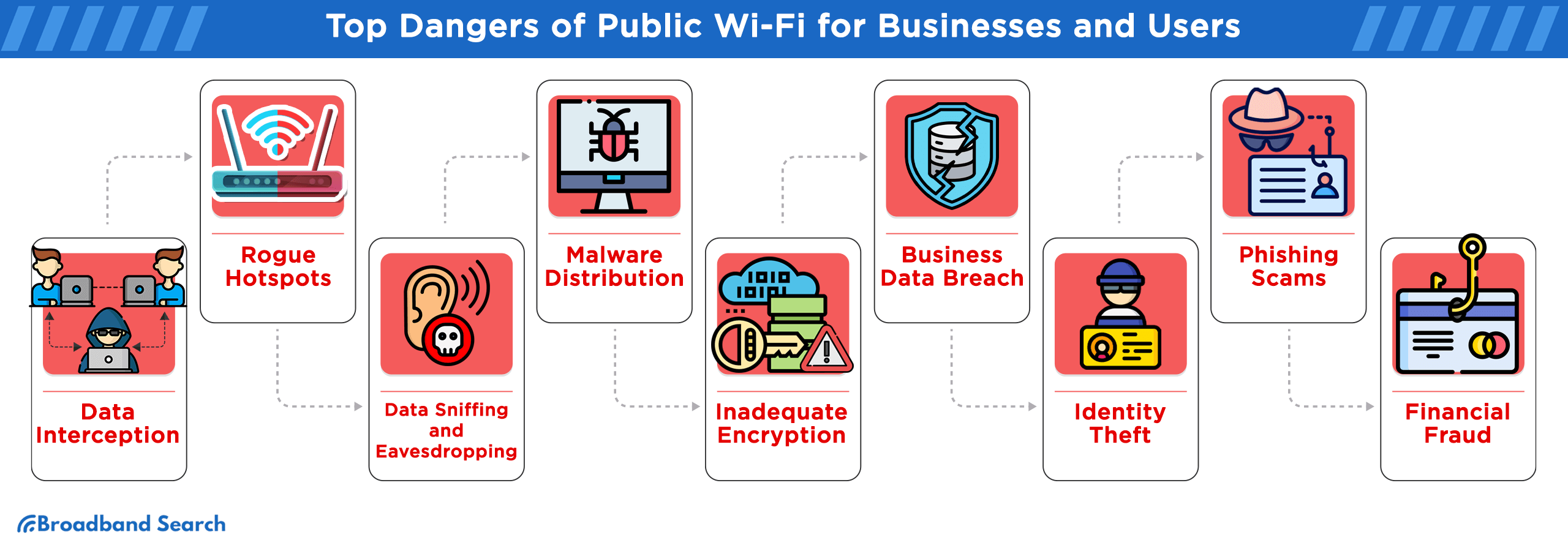
What are the top dangers of public WiFi for businesses and users?
Hackers can easily steal private information from users on public Wi-Fi. Public networks often lack security, leaving sensitive information vulnerable to cyberattacks.
- Data Interception: Hackers can intercept sensitive data that users send or receive using public WiFi.
- Rogue Hotspots: Individuals may unknowingly connect to malicious WiFi networks that appear legitimate, putting their data at risk.
- Data Sniffing and Eavesdropping: Unauthorized individuals can easily capture unencrypted data sent over public networks.
- Malware Distribution: Users can inadvertently download harmful software on their devices when connected to an at-risk network.
- Session Hijacking: Cybercriminals can hijack users' active sessions, such as their email or social media accounts.
- Inadequate Encryption: Many public WiFi networks lack strong encryption, making it easy for cybercriminals to capture user data.
- Business Data Breach: Crucial business information can fall into the wrong hands, leading to significant repercussions.
- Identity Theft: Hackers can steal personal data from unsuspecting users and misuse it, leading to identity fraud.
- Phishing Scams: Deceitful prompts and fake login pages are tools used in phishing.
- Financial Fraud: Conducting financial transactions over public WiFi can be risky.
Do's and Don'ts of Using Public Wi-Fi
Public Wi-Fi networks are convenient but unsecured. Using them can expose your personal data to theft and cyberattacks. To stay safe, you must stay up to date on the latest security measures to protect your information.
The Do's
- Verify the network source: Always confirm the exact network name (SSID) with an employee to ensure you are connecting to the legitimate network and not an attacker-controlled "evil twin" hotspot.
- Employ a VPN: Use a Virtual Private Network (VPN) to encrypt all your traffic, creating a secure, private tunnel between your device and the internet and effectively shielding your activity from others on the same network.
- Prioritize HTTPS: Restrict your browsing to websites that use HTTPS (indicated by a padlock icon in the address bar), which ensures an encrypted connection.
- Manage device settings: Disable automatic Wi-Fi connection settings to prevent your device from joining unknown networks without your consent. Also, turn off services such as file sharing and AirDrop to prevent unauthorized access to your device's contents.
- Enable multi-factor authentication (MFA): Use MFA on all your accounts for an essential, extra layer of security that makes unauthorized access significantly more complicated, even if your password is stolen.
The Dont's
- Avoid password reuse: Never use the same password for multiple accounts. If one account is compromised, the attacker won't be able to access your other services.
- Refrain from accessing sensitive portals: Do not access highly sensitive websites like banking, tax, or HR portals over open Wi-Fi, even with a VPN. These activities require maximum security, ideally over a private, secure connection.
- Decline system updates: Never install system updates or new applications over an unsecured public connection, as this could expose your device to potential malware or man-in-the-middle attacks.
- Sign out completely: Always log out of all accounts when you have finished using them; do not rely on session timeouts to protect your data.
Which trends will shape the future of public WiFi?
Advances in technology are moving beyond speed and efficiency to focus on connectivity and enhanced security as we look forward to future trends that will reshape our understanding of public Wi-Fi and potential applications.
- 5G Integration: Users get a faster and more reliable online experience with less lag and fewer slowdowns, even in crowded places.
- Mesh Networking: Mesh networking uses multiple, interconnected nodes to provide a single, consistent WiFi signal over a large area. It ensures uninterrupted connectivity even in crowded places like large venues.
- AI-based Security Features: Cybersecurity is critical. AI-powered security uses machine learning and real-time analysis to protect public WiFi networks from increasingly advanced cyber threats.
FAQ
How can I protect my data while using public WiFi?
Before connecting to a public network, you must confirm the WiFi network's name with the staff. Protect your data by using a VPN, avoiding sensitive transactions, and logging out of your accounts when you are finished.
How frequently do incidents and breaches occur on public WiFi networks?
In 2024, the FBI's Internet Crime Complaint Center (IC3) received over 859,000 complaints, with reported losses exceeding $16 billion—the 33% increase from 2023 signals the risks facing both the public and private sectors.
Is it safe to access my bank account on a public network?
It's not recommended to access your bank account while on public WiFi. If you must access your bank account, ensure you use a secure connection (HTTPS) and, preferably, a VPN.
Are there costs associated with using public WiFi?
While many public WiFi networks are free, some might charge a fee or require a purchase. You may also face time limits, making it essential to understand all the terms before connecting.
Can public WiFi track my browsing history?
Yes, the administrators of public WiFi networks can view the activity of connected devices. It's always best to assume someone might see what you're doing.
How do I find the fastest public Wi-Fi near me?
You can use apps like Google Maps or dedicated Wi-Fi finder apps to locate hotspots, then look for chains known for reliable Wi-Fi, like McDonald's or libraries. Run a speed test on your device to confirm which hotspot is actually the fastest.