
Satellite internet has changed more in the past five years than in the previous two decades. The technology most people associate with slow speeds and half-second delays (the kind that made video calls frustrating and gaming impractical) describes a different generation of satellites than the ones delivering service today. Low Earth orbit (LEO) systems like Starlink have replaced that experience with real-world speeds of 50–250 Mbps and latency of 20–60ms, making satellite broadband a practical option for remote work, streaming, and everyday household use in areas where cable and fiber do not reach. For the roughly 21 million Americans in rural areas who lack access to wired broadband, satellite internet is no longer a fallback. For many households, it is the best available option.
What Is Satellite Internet? Quick Answer
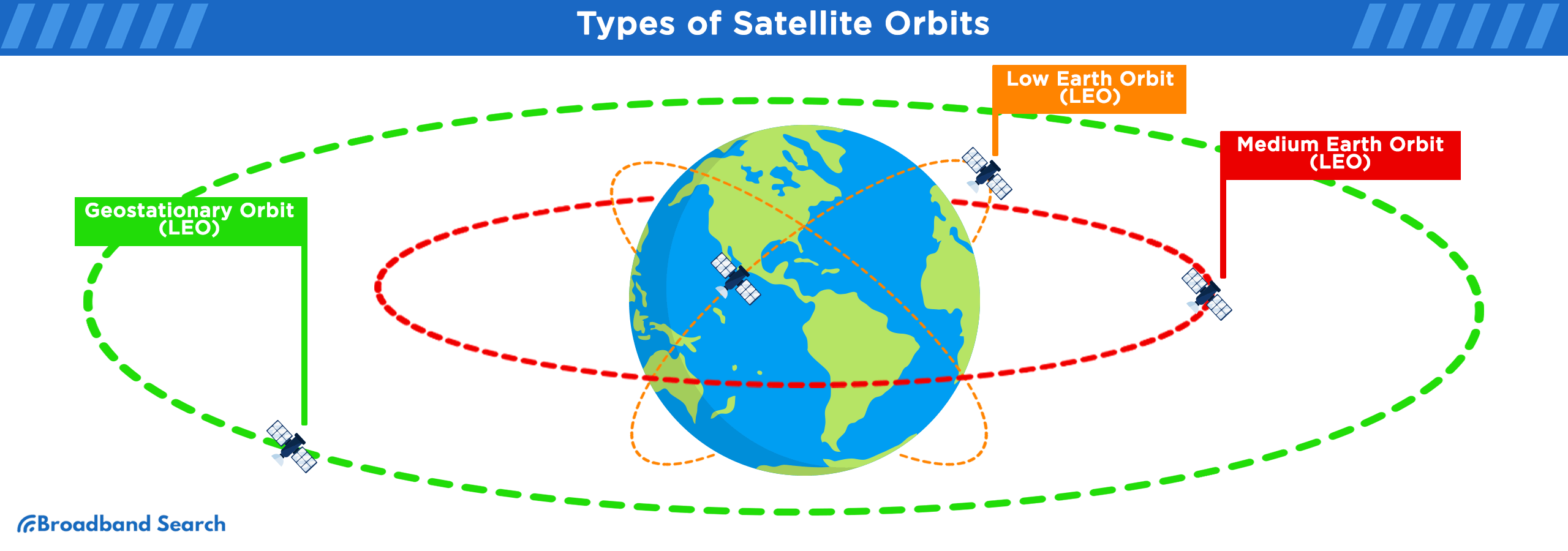
Satellite internet is a broadband service that delivers internet access through signals transmitted between a dish at your home, a satellite orbiting Earth, and a ground station connected to the internet. Modern LEO satellite systems like Starlink orbit at approximately 550 kilometers (342 miles) above Earth, close enough to deliver latency comparable to fixed wireless and DSL. Older geostationary (GEO) systems like HughesNet and Viasat orbit at roughly 35,786 kilometers (22,236 miles), which produces higher latency but offers broad coverage across North America. Plans start at around $50–$75 per month for GEO services and $50 per month for Starlink's intro residential tier.
Key Takeaways: Satellite Internet in 2026
- Satellite internet is available virtually everywhere in the continental United States, making it the most accessible broadband option for rural households
- LEO systems (Starlink) deliver 50–250 Mbps with 20–60ms latency; GEO systems (HughesNet, Viasat) deliver 25–150 Mbps with 600–700ms latency
- Starlink residential service starts at $50 per month with a $349 equipment cost; HughesNet starts at approximately $50 per month with lease options available
- LEO satellite internet supports video conferencing, 4K streaming, and online gaming; GEO satellite internet is better suited to browsing, email, and standard video streaming
- Data policies vary significantly, as most plans include a priority data allotment that, once used, results in reduced speeds during peak hours
- Amazon Leo launched an enterprise beta in April 2026 and is expected to offer residential service later in 2026, which will introduce additional competition in the LEO market
Find Out Which Satellite Providers Serve Your Exact Location.
Satellite coverage is not one-size-fits-all. Enter your zip and see which satellite and rural internet providers are available at your specific address before you commit to one.
What Is Satellite Internet?
Satellite internet is a type of broadband that uses orbiting satellites to transmit data between your home and the internet, rather than cables buried in the ground or cell towers on land. It works anywhere with a clear view of the sky, which is why it is the primary broadband option for rural areas, remote properties, RVs, boats, and locations where physical infrastructure does not exist.
Satellite internet is distinct from fixed wireless internet, which transmits signals between ground-based towers and a receiver at your home. Both serve rural areas, but satellite works where fixed wireless towers do not reach and where terrain such as mountains, dense forest, and remote valleys makes tower deployment impractical.
How Does Satellite Internet Work?
Satellite internet works by relaying data through three points: your home dish, an orbiting satellite, and a ground station connected to the internet backbone. Each of these links introduces a small amount of transmission delay, and the altitude of the satellite is the primary factor that determines how much delay occurs.
When you send a request (loading a page, starting a video call, joining a game), the signal travels from your dish at roughly the speed of light through space to the satellite, then back down to a ground station, then out to the internet. The response takes the same path in reverse. For a GEO satellite sitting at 35,786 kilometers (22,236 miles) above the equator, each one-way trip covers over 35,000 kilometers (21,748 miles), producing a round-trip latency of 600–700ms. For a LEO satellite at 550 kilometers (342 miles), the same round trip takes 20–60ms.
Modern LEO systems address the high-latency problem by operating large constellations. Starlink has deployed over 6,000 satellites as of early 2026, so that multiple satellites are always visible from any location. The dish selects the best available satellite and hands off between them as they pass overhead, maintaining a continuous connection.
The dish itself uses phased-array antenna technology, which allows it to electronically steer its beam toward the satellite without any moving parts on newer hardware. This improves reliability in adverse conditions and reduces the mechanical failure points of earlier dish designs.
LEO vs. GEO Satellite Internet: What Is the Difference?
LEO (Low Earth Orbit) and GEO (Geostationary Orbit) satellite systems are fundamentally different technologies that serve different use cases. LEO satellites orbit between 300 and 1,200 kilometers (186–746 miles) above Earth; GEO satellites sit at a fixed point 35,786 kilometers (22,236 miles) above the equator and appear stationary in the sky.
Feature | LEO (Starlink, Leo) | GEO (HughesNet, Viasat) |
Orbital altitude | ~550 km (~342 miles) | ~35,786 km (~22,236 miles) |
Typical latency | 20–60ms | 600–700ms |
Typical speeds | 50–250 Mbps | 25–150 Mbps |
Priority data allotments; some unlimited tiers | Hard data caps or throttled tiers | |
Equipment cost | $349–$599 (Starlink) | $0–$199 (lease options available) |
Monthly starting price | $50/mo (Starlink residential) | ~$50/mo (HughesNet) |
Best for | Remote work, gaming, video calls, streaming | Email, browsing, basic streaming |
Coverage | Near-global, expanding | Continental U.S. fully covered |
LEO Pros and Cons
Pros | Cons |
Low latency (20–60ms) suitable for video calls and gaming | Higher upfront equipment cost ($349+) |
Higher speeds (50–250 Mbps) than GEO | Monthly pricing significantly higher than GEO |
Service quality can vary during network congestion | |
Improving reliability as constellations expand | Fewer established providers than GEO |
GEO Pros and Cons
Pros | Cons |
Lower monthly starting price | 600–700ms latency makes video calls and gaming impractical |
Established providers with long track records | More restrictive data caps at entry-level tiers |
$0-down equipment lease options available | Speeds do not match LEO at equivalent price points |
Broad coverage with no geographic gaps | 24-month contracts with early termination fees |
Direct-to-Cell and Amazon Leo
Direct-to-Cell satellite coverage is a newer capability available through select LEO providers including Starlink (in partnership with T-Mobile). It allows compatible smartphones to send and receive text messages and access basic data directly through the satellite constellation without a dish, using the phone's existing antenna. As of 2026, direct-to-cell service is primarily available for emergency messaging and basic connectivity, not as a replacement for full broadband.
Amazon Leo (formerly Amazon Kuiper, rebranded November 2025) launched an enterprise beta on April 8, 2026, with residential consumer availability expected later in 2026. It is a LEO constellation designed to compete directly with Starlink. Specific residential plan details and pricing have not been finalized; coverage and performance data from the enterprise beta is limited. Amazon Leo is worth monitoring as it enters the consumer market, as competitive pressure from a second major LEO provider is likely to affect pricing and service terms across the category.
Satellite Internet Plans and Pricing: Starlink, HughesNet, and Viasat
Satellite internet pricing varies significantly by provider, plan tier, and whether you purchase or lease the equipment. The table below reflects published pricing and plan details as of early 2026.
Provider | Plan | Monthly Price | Equipment Cost | |||
Starlink | Residential | $50/mo | 50–200 Mbps | 20–60ms | 1 TB priority, then deprioritized | $349 (purchase) |
Starlink | Priority (residential add-on) | From $40/mo add-on | Up to 1 Gbps | 20–60ms | Priority data purchased in GB | $349+ hardware |
Starlink | Roam (RV/travel) | $165/mo | 50–200 Mbps | 20–60ms | 50 GB priority, then deprioritized | $349 (purchase) |
Starlink | Mini | $599 hardware + $30/mo add-on | 50–100 Mbps | 20–60ms | 50 GB mobile data | $599 (purchase) |
HughesNet | Select | ~$50/mo (introductory) | 25–50 Mbps | 600–700ms | 15 GB priority data | $0 (lease) or purchase |
HughesNet | Elite | ~$65/mo | 50–100 Mbps | 600–700ms | 100 GB priority data | $0 (lease) or purchase |
Viasat | Unlimited Bronze 25 | ~$70/mo | 25 Mbps | 600–700ms | Unlimited (deprioritized at peak) | $0–$199 |
Viasat | Unlimited Gold 50 | ~$100/mo | 50 Mbps | 600–700ms | Unlimited (deprioritized at peak) | $0–$199 |
Prices reflect published rates as of early 2026. Introductory rates for HughesNet and Viasat typically increase after the first 3–6 months. Confirm current pricing directly with providers before signing up.
On equipment costs: Starlink requires purchasing the dish and router upfront. There is no lease option for residential service. HughesNet and Viasat both offer $0-down equipment leases, which lowers the barrier to entry significantly. The trade-off is that leased equipment ties you to the provider; owned equipment can be resold or moved to a new address.
On contracts: Starlink residential service has no annual contract. HughesNet and Viasat plans typically require 24-month contracts, with early termination fees if you cancel before the term ends.
Satellite Internet Data Policies: Caps, Throttling, and Priority Data
Data policies are one of the most important factors to understand before choosing a satellite internet plan, and they vary considerably between providers and plan tiers.
Priority data is the term used by most satellite providers for the high-speed data allotment included in a plan. During periods of network congestion, customers who have used their priority data allotment receive lower speeds than those who have not. Starlink residential plans include 1 TB of priority data per month; after that threshold, speeds are reduced during busy hours but are not cut off entirely. In low-traffic periods such as late night and early morning, speeds typically return to normal even after the priority allotment is exhausted.
Hard data caps on satellite internet are less common than they were in earlier generations of the technology, but some GEO plans still apply them. HughesNet's lower tiers cap priority data at 15 GB per month, after which speeds drop to 1–3 Mbps for the remainder of the billing cycle. This is usable for basic browsing and email but not for video streaming or video calls.
Truly unlimited satellite internet, in the sense of no speed reduction at any usage level, is available on some Viasat plans and on Starlink's higher-tier Priority add-ons, but these carry higher monthly costs. For most households, the practical question is whether the priority data allotment in a standard plan covers typical monthly usage. A household that streams video, works from home, and uses video conferencing regularly will use 200–500 GB per month under typical conditions.
Data rollover is not offered by any major satellite provider as of 2026. Unused priority data does not carry over to the next month.
Pros and Cons of Satellite Internet
Satellite internet is the right solution for some households and the wrong one for others. Understanding the trade-offs before committing is important, particularly given the equipment costs and contract terms involved.
| Pros | Cons |
Coverage | Available virtually everywhere with a clear sky view | Requires unobstructed view — trees, buildings, and terrain can block signal |
Speed | LEO speeds (50–250 Mbps) are sufficient for most household uses | Speeds vary more than cable or fiber under load and weather conditions |
Latency | LEO latency (20–60ms) is suitable for video calls and gaming | GEO latency (600–700ms) is too high for real-time applications |
Cost | GEO plans start as low as $50/mo with no equipment upfront | LEO equipment costs $349+ upfront; monthly costs are higher than DSL or cable where available |
Contracts | Starlink has no annual contract | HughesNet and Viasat require 24-month contracts with early termination fees |
Availability | No dependence on ground infrastructure | Weather events (heavy rain, snow accumulation on dish) can cause temporary outages |
Portability | Starlink Mobile and Mini plans work across locations | Portable plans cost more per month than fixed residential plans |
How Does Satellite Internet Compare to Other Rural Internet Options?
Satellite internet is one of several options available to rural households, and it is not always the best choice. DSL, fixed wireless, and mobile broadband each serve different situations. The right option depends on what is available at your specific address.
Connection Type | Typical Speed | Latency | Availability | Monthly Cost | Best For |
Satellite (LEO — Starlink) | 50–250 Mbps | 20–60ms | Near-universal | $50+/mo | Remote locations with no other options |
Satellite (GEO — HughesNet/Viasat) | 25–150 Mbps | 600–700ms | Universal | $50–$100/mo | Budget-conscious users; basic use only |
Fixed Wireless (5G/LTE) | 25–300 Mbps | 10–50ms | Within range of towers | $50–$100/mo | Rural areas within 10–15 miles of a tower |
DSL | 10–100 Mbps | 20–50ms | Along phone lines | $30–$60/mo | Rural areas with phone infrastructure |
100 Mbps–1 Gbps | 10–30ms | Limited rural availability | $50–$100/mo | Where available, preferred over satellite | |
300 Mbps–5 Gbps | <10ms | Very limited rural availability | $50–$120/mo | Where available, the best option |
Fixed wireless vs. satellite: Fixed wireless internet transmits a signal from a tower to a receiver at your home, similar to a cell signal but dedicated to home internet. It delivers lower latency than satellite and comparable speeds. The limitation is distance: fixed wireless is typically available within 10–15 miles of a tower, and signal quality degrades with distance and terrain obstacles like hills, dense tree cover, and buildings. In areas where fixed wireless is available, it is generally a better value than LEO satellite due to lower equipment costs and competitive monthly pricing.
DSL vs. satellite: DSL runs over existing telephone copper wiring and is available in most rural areas with phone service. Speeds are lower than satellite at most price points, and DSL performance degrades with distance from the provider's central office. In areas more than 3–5 miles from a central office, DSL speeds can drop below 10 Mbps, adequate for basic use but not for streaming or video calls. Satellite is the better choice for any household that needs more than that.
Cable vs. satellite: Cable internet is significantly faster, cheaper, and lower-latency than satellite where it is available. It is, however, rarely available in rural areas. If cable service reaches your address, it is preferable to satellite internet in nearly every use case.
Who Is Satellite Internet Best For?
Satellite internet is the best available option for households and users in specific situations where wired or fixed wireless broadband is not accessible.
Rural households without cable, fiber, or fixed wireless access represent the primary use case. If your address has no wired broadband option and fixed wireless broadband towers are too far away, LEO satellite is the most capable technology available to you. At 50–250 Mbps with 20–60ms latency, Starlink supports remote work, video conferencing, streaming, and household device use simultaneously.
Remote workers and home office users in rural areas can use LEO satellite effectively for video conferencing, cloud applications, and file transfers. The 20–60ms latency range is sufficient for Zoom, Microsoft Teams, and Google Meet. Upload speeds on Starlink residential (typically 10–20 Mbps) are adequate for most video call formats but may be a limiting factor for users who regularly transfer large files or run bandwidth-intensive cloud workflows.
RV travelers, boaters, and digital nomads are well-served by Starlink Roam and Starlink Mini plans. Starlink Mini is a compact, lower-power dish designed for portability, weighing approximately 1.1 kg and fitting in a backpack. It requires a $30/month mobile data add-on for in-motion use. For boaters, Starlink's maritime plans provide coverage across coastal and offshore routes, though at significantly higher monthly costs than residential plans.
Households on tight budgets in rural areas may find GEO satellite (HughesNet or Viasat) to be the more accessible entry point due to $0-down equipment options and lower monthly starting prices. The trade-off is higher latency and more restrictive data policies. GEO satellite is appropriate for households whose primary needs are email, basic web browsing, and standard-definition video streaming.
Satellite internet is not the best choice for households that have cable, fiber, or reliable fixed wireless available at their address. In those cases, wired or fixed wireless options deliver better performance at lower cost. It is also not ideal for users whose primary use case is competitive online gaming, where even LEO latency (20–60ms) is a disadvantage compared to the sub-10ms latency of a fiber connection.
How to Get and Set Up Satellite Internet
Getting satellite internet involves ordering service, receiving hardware, and installing the dish. The process varies by provider.
Starlink self-installation is designed for a single person to complete without professional help. The Starlink app guides you through finding a clear sky view using your phone's camera before you order — it shows exactly what obstructions are in the satellite's path from your proposed installation location. The dish requires an unobstructed view of the sky from approximately 100 degrees elevation down to about 25 degrees above the horizon in the northern direction (for Northern Hemisphere users). Trees, rooftops, chimneys, and nearby buildings that fall within this zone will cause signal interruptions.
Once hardware arrives, setup involves mounting the dish on a provided base or a pole mount, connecting the cable to the router, and powering the system on. The dish aligns itself automatically. Most installations take 30–60 minutes.
Viasat and HughesNet use professional installation through contracted technicians. The technician handles dish placement, mounting, cabling, and alignment. Professional installation is included in the setup fee for most plans, which ranges from $0 to $199 depending on the provider and plan. GEO dishes must be aimed precisely at a fixed point in the southern sky and require a clear line of sight to that orbital position.
Obstruction is the most common installation problem. The Fresnel zone, the cone-shaped area around the direct line between your dish and the satellite, must be clear of obstructions. A tree branch that seems small from the ground can cause repeated signal drops. Starlink's app obstruction check is the most reliable way to identify problems before mounting.
For RV and portable use: Starlink Mini and Mobile plans allow the dish to be used at different locations. The Mini dish can be powered by a battery pack with sufficient wattage (the dish draws approximately 25–40 watts), making it practical for off-grid use. Standard Starlink residential dishes require the Starlink Mobile plan add-on to be used at non-registered addresses.
See Every Internet Provider Available Where You Live.
BroadbandSearch pulls every provider available in your area, satellite and otherwise, so you can compare all your options and choose based on what's actually accessible to you.
FAQ
How Much Does Satellite Internet Cost Per Month?
Satellite internet monthly costs range from approximately $50 per month for entry-level GEO service (HughesNet) to $50 per month for Starlink's intro residential plan. Viasat plans fall between $70 and $150 per month depending on the speed tier. Equipment costs are separate: Starlink requires a $349 dish purchase upfront, while HughesNet and Viasat offer $0-down lease options. Most GEO providers require 24-month contracts; Starlink has no annual contract for residential service. You can learn more with these steps to lower your internet bill.
What Is the Best Satellite Internet Provider in 2026?
Starlink is the best satellite internet provider in 2026 for most households that need a full-service broadband connection. Its LEO network delivers 50–250 Mbps with 20–60ms latency, which supports remote work, streaming, video conferencing, and gaming in a way that GEO alternatives cannot match. HughesNet and Viasat are better suited to households with basic connectivity needs and tighter budgets, where the lower monthly cost and $0 equipment lease options are more important than performance.
Is Starlink Worth It in 2026?
Starlink is worth it for households in rural or remote areas without access to cable, fiber, or reliable fixed wireless internet. At $50 per month with a $349 equipment purchase, it delivers broadband-class performance with speeds and latency sufficient for remote work, streaming, and gaming in locations where no comparable alternative exists. For households that have cable or fiber available, Starlink is rarely the better value. The comparison that matters is Starlink vs. the best option actually available at your address.
Does Satellite Internet Have Data Caps?
Most satellite internet plans limit the amount of priority-speed data available each month, after which speeds are reduced during peak hours. Starlink's residential plan includes 1 TB of priority data before deprioritization. HughesNet's entry-level plans cap priority data at 15 GB, and speeds drop significantly after that threshold. Viasat's unlimited plans do not have hard caps but do reduce speeds during congestion. Truly unlimited satellite internet with no speed reduction at any usage level is available on premium plan tiers at higher monthly costs.
Is Satellite Internet Good Enough for Working From Home?
LEO satellite internet is sufficient for working from home for most professional roles. Video conferencing on Zoom, Teams, and Google Meet functions normally within Starlink's latency and speed range. Cloud applications, email, document collaboration, and web-based tools all work as expected. The primary limitations are upload speed (10–20 Mbps average on Starlink residential) for users who regularly transfer large files, and occasional latency spikes during congested periods. For roles that require consistently low latency, such as real-time trading, remote desktop sessions, or live broadcast work, LEO satellite introduces more variability than a wired connection.
Is Satellite Internet Good for Streaming?
LEO satellite internet supports 4K streaming reliably under normal conditions. Netflix 4K requires approximately 25 Mbps of sustained throughput, and Starlink's residential plan delivers well above that in most conditions. The variable to watch is priority data: on GEO plans with low allotments (15–100 GB), 4K streaming will exhaust the monthly allotment quickly, since a single hour of 4K streaming uses approximately 7 GB. GEO satellite handles standard-definition and HD streaming adequately within its data limits. LEO satellite handles 4K streaming without issue as long as the priority data allotment has not been exhausted.
Is Satellite Internet Good for Online Gaming?
LEO satellite internet is suitable for casual and mid-level online gaming. Starlink's 20–60ms latency range supports most multiplayer titles where timing matters. It is not equivalent to fiber's sub-10ms latency, and users in areas with higher network congestion may experience occasional spikes above 60ms. For professional or highly competitive play where sub-20ms latency is the baseline, LEO satellite remains at a disadvantage. GEO satellite internet at 600–700ms latency makes real-time multiplayer gaming impractical. HughesNet's Fusion service, which combines GEO satellite with LTE cellular to reduce effective latency, improves the experience for some applications but does not fully resolve the gap for fast-paced online games.
Does Satellite Internet Work in Bad Weather?
Modern satellite systems are significantly more resilient to weather than earlier generations, but heavy precipitation still affects signal quality. Rain and snow cause Ka-band signal attenuation, the technical term for signal weakening caused by water in the atmosphere. Starlink's phased-array dishes include a snow-melt function that heats the dish surface to prevent accumulation. Light to moderate rain causes minimal impact for most users; heavy thunderstorms or blizzard conditions can cause temporary outages. GEO systems tend to be more affected by rain fade than LEO systems, which compensate partly through satellite diversity, meaning the ability to switch between multiple visible satellites when one path is degraded.
Can I Get Satellite Internet for My RV or Boat?
Yes. Starlink offers a Mobile plan ($165/month) and the Starlink Mini ($599 hardware, $30/month mobile data add-on) specifically for use across multiple locations, including RVs, campers, and boats. The standard residential dish can also be used at non-home locations with the Mobile plan add-on. For marine use, Starlink's maritime plans extend coverage to coastal and offshore areas, though at higher monthly costs than land-based plans. HughesNet and Viasat residential plans are tied to a fixed installation address and are not designed for mobile use.
Can You Get Satellite Internet Without a Dish?
Direct-to-cell satellite service, available through Starlink in partnership with T-Mobile, allows compatible smartphones to send and receive text messages and access basic data using the satellite constellation without a dish. As of 2026, this service is primarily for emergency messaging and limited connectivity. It is not a replacement for dish-based broadband. For full satellite broadband service, a dish installation is required.
How Does Satellite Internet Compare to Fiber Internet?
Fiber internet is faster, lower-latency, and more consistent than satellite internet in every performance category. Fiber delivers speeds from 300 Mbps to 5 Gbps with latency below 10ms and no data cap restrictions. The significant limitation is availability. Fiber infrastructure reaches a small fraction of rural addresses. Where fiber is available, it is the better choice in all respects. Where it is not, LEO satellite is the next-best option for households that need broadband-class performance. You can learn more about what equipment you need for fiber internet here.
Is There Satellite Internet Without a Contract?
Starlink residential service requires no annual contract and can be cancelled at any time. HughesNet and Viasat both require 24-month service agreements for most plans, with early termination fees that can reach $300–$400 depending on how early in the contract you cancel. If contract flexibility is a priority, Starlink is the only major provider that offers it at the residential level.
What Should I Do if My Satellite Dish Is Blocked by Trees?
Starlink's app includes an obstruction detection tool that uses your phone's camera to map the sky view from a proposed installation location before you mount the dish. Run this check from multiple positions around your property, including a rooftop, a pole mount in the yard, and a clear wall mount, to find the location with the least obstruction. Even partial tree coverage in the satellite's path will cause intermittent signal drops. If tree removal or trimming is feasible, addressing the obstruction before installation prevents ongoing service issues. For properties with no viable unobstructed location, satellite internet may not be a reliable option regardless of provider. You can find more tips for fixing common home Wi-Fi problems here.