
Ethernet and Wi-Fi both connect your devices to the internet, but they do it differently. And those differences matter depending on what you're doing. Wi-Fi 6 is the standard in most homes today, delivering real-world speeds of 400–900 Mbps for everyday use. A gigabit Ethernet connection over Cat5e or Cat6 cable delivers comparable speeds with lower latency, zero wireless interference, and consistent performance regardless of how many other devices are online at once. One is not always better than the other. The right choice depends on the device, the activity, and how your home is set up. This guide explains both and helps you decide when Wi-Fi is sufficient and when running a cable is worth the effort.
Wired vs. Wi-Fi Internet in 2026: Quick Answer
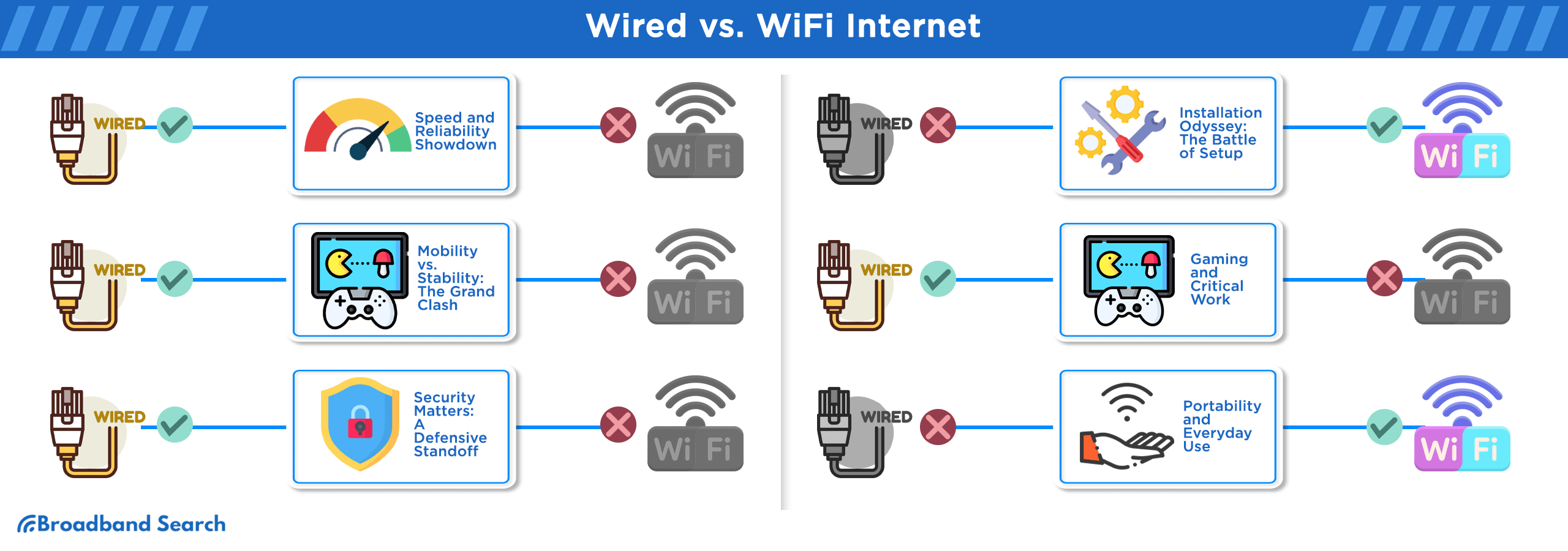
Ethernet delivers faster, more stable, and lower-latency performance than Wi-Fi for stationary devices. Wi-Fi is more convenient and sufficient for most everyday tasks on phones, tablets, and laptops. For gaming, video conferencing, 4K streaming, and home office workstations, a wired gigabit Ethernet connection over Cat5e or Cat6 delivers measurably better performance. For browsing, streaming on a phone, and smart home devices, Wi-Fi 6 handles it without issue. Most households benefit from using both: wired connections for stationary high-demand devices, Wi-Fi for everything mobile.
Key Takeaways: Wired vs. Wi-Fi in 2026
- Gigabit Ethernet (1 Gbps) over Cat5e or Cat6 is the current home wiring standard and handles most online demands
- Wi-Fi 6 (802.11ax) is the dominant wireless standard in 2026, delivering 400–900 Mbps in real-world home conditions
- Ethernet delivers latency below 1ms; Wi-Fi 6 typically delivers 10–20ms under normal home conditions
- Wi-Fi operates as a shared medium — devices contend for airtime, which reduces throughput for each device under heavy load
- Wiring the nodes in a mesh Wi-Fi system together significantly improves whole-home performance
- Wi-Fi 7 and multi-gigabit Ethernet exist but are not yet common in most homes
What Is the Difference Between Internet and Wi-Fi?
The internet is the data service your ISP delivers to your home through a cable, fiber line, or wireless signal. It enters at your modem or gateway. Wi-Fi is one method of distributing that data to your devices wirelessly, using radio signals broadcast by your router.
A wired internet connection, also called a hardwired connection, uses an Ethernet cable to connect a device directly to your router or network switch. No radio signals are involved. The data travels through the cable at full speed, with no interference and no competition from other wireless devices.
The practical difference is this: your internet speed is determined by your ISP plan. How much of that speed each device actually receives depends on whether it connects via Wi-Fi or Ethernet.
Wi-Fi introduces variables that Ethernet does not: distance from the router causes signal decay, building materials absorb or reflect the signal, neighboring networks and household electronics cause interference, and the wireless channel is shared among all connected devices. A device connected via Ethernet bypasses all of these variables and receives its own dedicated connection.
Ethernet operates as full-duplex: a device can send and receive data simultaneously on its own dedicated connection. Wi-Fi is a shared medium where devices take turns transmitting. Only one device on a given radio channel transmits at a time. This is why a wired connection feels more responsive under heavy household network load, even at the same nominal speed.
Is Ethernet Faster Than Wi-Fi in Real-World Home Use?
Ethernet delivers faster and more consistent speeds than Wi-Fi under real-world home conditions. The gap is most visible when multiple devices are active simultaneously or when the router is more than one room away.
A Gigabit Ethernet connection over Cat5e or Cat6 cable delivers up to 1,000 Mbps (1 Gbps) with latency consistently below 1ms. This is the standard home wiring setup and handles every current residential use case, including 4K streaming, video conferencing, online gaming, and large file transfers, without bottlenecks.
Wi-Fi 6 (802.11ax), the dominant wireless standard in most homes today, has a theoretical maximum of 9.6 Gbps across all bands. In practice, a single device on a 5 GHz Wi-Fi 6 network in a typical home sees 400–900 Mbps under good conditions. Speed drops with distance, and decreases further as more devices connect and compete for airtime.
The table below compares the standards most households encounter. Typical real-world speeds are for a single device under normal home conditions; actual performance varies based on distance, device capability, and network load:
Connection Type | Theoretical Max | Typical Real-World Speed | Latency | Reliability |
Wi-Fi 5 (802.11ac) | 3.5 Gbps | 100–400 Mbps | 15–30ms | Moderate |
Wi-Fi 6 (802.11ax) | 9.6 Gbps | 400–900 Mbps | 10–20ms | Good |
Wi-Fi 6E (6 GHz band) | 9.6 Gbps | 600 Mbps–1.2 Gbps | 8–15ms | Good (shorter range) |
Cat5e Ethernet | 1 Gbps | Up to 1,000 Mbps | <1ms | Excellent |
Cat6 Ethernet | 1–10 Gbps* | Up to 1,000 Mbps (home runs) | <1ms | Excellent |
Cat6a Ethernet | 10 Gbps | Up to 10,000 Mbps | <1ms | Excellent |
*Cat6 supports 10 Gbps up to 55 meters (180 feet). For typical home cable runs under that distance, Cat6 performs identically to Cat6a at gigabit speeds. For runs over 55 meters, Cat6a is required for reliable 10 Gbps.
Wi-Fi Standards Compared: Wi-Fi 4 Through Wi-Fi 7
Wi-Fi standards are certified by the Wi-Fi Alliance and assigned generation numbers that correspond to the underlying 802.11 protocol. The table below shows each standard's real-world characteristics. Many homes contain devices spanning multiple generations, so understanding the baseline of your oldest device helps set realistic performance expectations.
Wi-Fi Generation | Protocol | Frequency Bands | Typical Real-World Speed | Key Feature | Common In Homes |
Wi-Fi 4 | 802.11n | 2.4 GHz / 5 GHz | 50–150 Mbps | MIMO introduced | Older devices, budget routers |
Wi-Fi 5 | 802.11ac | 5 GHz | 100–400 Mbps | MU-MIMO, beamforming | Still widely deployed |
Wi-Fi 6 | 802.11ax | 2.4 GHz / 5 GHz | 400–900 Mbps | OFDMA, better dense-device handling | Current mainstream standard |
Wi-Fi 6E | 802.11ax (extended) | 2.4 / 5 / 6 GHz | 600 Mbps–1.2 Gbps | Uncongested 6 GHz band | Newer routers and devices (2022+) |
Wi-Fi 7 | 802.11be | 2.4 / 5 / 6 GHz | 2–4 Gbps (early estimates) | Multi-Link Operation, 320 MHz channels | Emerging — limited device support |
OFDMA (Orthogonal Frequency Division Multiple Access) is the key advance in Wi-Fi 6 over Wi-Fi 5. It allows a router to serve multiple devices simultaneously within a single transmission, rather than sequentially — which is why Wi-Fi 6 routers handle busy households with many connected devices more efficiently than Wi-Fi 5 hardware.
The 6 GHz band introduced in Wi-Fi 6E is less congested because relatively few devices use it. This makes Wi-Fi 6E the best-performing wireless option available in most homes today for devices that support it, though its higher frequency has an even shorter range than 5 GHz.
Comparing Ethernet Cable Standards
The Ethernet cable running through your walls is often the overlooked variable in home network performance. Homes built before 2010 frequently have Cat5e wiring, which supports Gigabit speeds and is sufficient for most current needs. Homes wired for Cat6 or later have more headroom for future upgrades.
Cable Category | Max Speed | Max Speed Distance | Shielding | Best Use Case |
Cat5e | 1 Gbps | 100 meters | UTP (unshielded) | Gigabit home networks — fully adequate for most homes |
Cat6 | 1 Gbps (100m) / 10 Gbps (55m) | 100m at 1 Gbps | UTP or STP | Gigabit home networks with some upgrade headroom |
Cat6a | 10 Gbps | 100 meters | STP (shielded) | Multi-Gigabit home networks, NAS, prosumer setups |
Cat7 | 10 Gbps | 100 meters | S/FTP (fully shielded) | Data centers; proprietary connectors limit home use |
Cat8 | 25–40 Gbps | 30 meters | S/FTP | Data centers and server racks — not practical for home |
Distance and speed figures per TIA/EIA-568 and IEEE 802.3 standards.
For new home wiring or renovations: Cat6a is the recommended choice. It supports 10 Gbps at full home-run distances (100 meters), handles PoE++ without heat buildup issues, and provides meaningful headroom for multi-Gigabit internet plans becoming available from ISPs. The cost difference over Cat6 is modest at the time of installation but significant if you need to rewire later.
STP (Shielded Twisted Pair) cables like Cat6a have metallic shielding around each pair of wires, which reduces electromagnetic interference from nearby power lines, motors, or densely packed electronics. For most residential installations, UTP Cat5e or Cat6 performs without issue. STP is worth considering only if the cable runs near electrical panels, HVAC equipment, or industrial appliances.
Ready to see which internet providers and plans are available at your address? Search at BroadbandSearch to compare gigabit and multi-gigabit options in your area.
When Should You Use Ethernet vs. Wi-Fi?
The right connection type depends on what the device is doing, not just what it is. The table below maps common use cases to the recommended connection.
Use Case | Recommended Connection | Reason |
Desktop workstation or home office PC | Ethernet | Low latency, consistent upload for video calls and cloud sync |
Ethernet | Sub-1ms latency eliminates packet loss and jitter | |
Ethernet preferred, Wi-Fi 6 acceptable | Consistent throughput for 4K HDR; Wi-Fi 6 handles it if signal is strong | |
Laptop (mobile use) | Wi-Fi | Mobility makes wired impractical |
Smartphone / tablet | Wi-Fi | No Ethernet port; Wi-Fi 6 is sufficient |
Security cameras (indoor/outdoor) | Ethernet (PoE) preferred | Reliable upload, no interference, single cable for power and data |
Wi-Fi (2.4 GHz) | Low bandwidth requirements; 2.4 GHz range covers more of the home | |
Ethernet | High sustained transfer speeds require wired connection | |
Mesh Wi-Fi nodes | Ethernet backhaul preferred | Eliminates wireless congestion between nodes (see below) |
The general rule: devices that stay in one place and perform bandwidth- or latency-sensitive tasks benefit most from Ethernet. Devices that move around, or that only need occasional low-demand connectivity, are well-served by Wi-Fi.
Why Does Wiring Your Mesh Wi-Fi Nodes Make a Difference?
Connecting your mesh Wi-Fi nodes with Ethernet cables significantly improves whole-home network performance. In a wireless mesh system, each node must both communicate with your devices and relay traffic back to the main router. When nodes communicate wirelessly, they share the same radio resources for both tasks, which cuts the available bandwidth roughly in half at each wireless hop and introduces additional latency.
Wired backhaul, the Ethernet connection between mesh nodes, solves this by separating the two functions entirely. Each node uses Wi-Fi only for communicating with client devices, while data travels between nodes through the cable at full gigabit speed. The result is lower latency, higher throughput in distant rooms, and more stable performance under load.
Bufferbloat is a related problem that wired backhaul helps reduce. Bufferbloat occurs when large data buffers in network equipment cause inconsistent delays. You may have enough bandwidth for a task, but the unpredictable queuing creates lag spikes during video calls or gaming sessions. A wired backbone between nodes reduces the number of wireless hops where this queuing can accumulate.
If running Ethernet cable between nodes is not feasible, such as in a rental or across floors, look for mesh systems that dedicate a separate radio band exclusively to node-to-node communication. This is a partial substitute that avoids splitting client bandwidth, though it does not match a wired connection for latency or reliability.
Should You Use Ethernet for Your Home Office or Productivity Setup?
A wired Ethernet connection measurably improves home office performance for tasks that depend on sustained upload speeds and consistent latency. Video conferencing tools like Zoom, Microsoft Teams, and Google Meet are particularly sensitive to latency variation — a wired connection eliminates the fluctuations that cause frozen frames, audio dropouts, and reconnection delays on Wi-Fi.
Large file uploads to cloud services, backup operations, and syncing large project folders also benefit from the sustained throughput of a wired connection. Wi-Fi uploads are interrupted by competing device traffic and interference events that may last only milliseconds but are enough to cause retry delays in file transfer protocols.
For cloud-based productivity tools, the benefit of Ethernet is primarily latency consistency and upload reliability rather than raw speed. Most AI tools function on standard broadband at 25–50 Mbps. What wired connections provide is uninterrupted delivery: no dropped frames on a video feed used for real-time analysis, no stalled uploads when transferring large documents or datasets.
A home office setup worth wiring: the primary workstation, a VoIP phone or desktop speakerphone, and any network printer or storage device. These are stationary devices with high reliability requirements, exactly what Ethernet is built for.
Is Ethernet Worth It for Gaming and Streaming?
Ethernet is the better choice for gaming, and the difference is measurable. Online gaming performance is determined primarily by latency (ping) and jitter, which is the consistency of that latency over time. A wired gigabit connection delivers sub-1ms latency and near-zero jitter. Wi-Fi 6 in a well-configured home delivers 10–20ms latency with occasional spikes caused by interference or competing device traffic.
For casual gaming at lower skill levels, Wi-Fi 6 is adequate. For competitive play, where split-second timing affects outcomes, the latency difference between wired and wireless is meaningful. A single interference event from a neighboring network or a running microwave can cause a momentary spike to 50ms or higher on Wi-Fi, which is enough to register as a missed input in fast-paced games.
For 4K streaming, Wi-Fi 6 handles it reliably at close to medium range from the router. For 8K streaming, which requires sustained throughput of 50–100 Mbps, Ethernet or a very strong Wi-Fi 6E signal is the more reliable choice. The bandwidth requirement itself is not the limiting factor for most connections; consistent delivery without buffering interruptions is.
For home theater setups with a dedicated streaming device, smart TV, or gaming console, running a single Cat6 cable to each device is a one-time effort that eliminates an entire category of troubleshooting for years.
Looking Ahead: Wi-Fi 7 and Multi-Gigabit Ethernet
Wi-Fi 7 (802.11be) and multi-Gigabit Ethernet are both available now but not yet common in most homes. Understanding where they fit helps you make smarter decisions when purchasing new hardware.
Wi-Fi 7 introduces Multi-Link Operation (MLO), which allows a single device to transmit and receive across multiple frequency bands simultaneously, a meaningful advance over Wi-Fi 6's single-band-at-a-time approach. Theoretical maximum speeds reach 46 Gbps across all streams, though real-world single-device speeds in early 2026 testing land between 2 and 4 Gbps. The limitation today is client device support: as of 2026, Wi-Fi 7 is available in high-end laptops, newer flagship phones, and a small number of gaming devices. Most household devices remain on Wi-Fi 5 or Wi-Fi 6.
10 Gbps Ethernet over Cat6a is available in prosumer routers and network switches, and multi-Gigabit internet plans are being rolled out by fiber ISPs in select markets. For 10 Gbps to deliver its full benefit end-to-end, you need: a 10 Gbps internet plan, a router with a 10 Gbps WAN port, a network switch with 10 Gbps ports, Cat6a cabling throughout, and a device with a 10 Gbps network card. In a typical home today, none of those components are standard.
If you are buying a new router in 2026, Wi-Fi 6E hardware is the current best value. It provides the uncongested 6 GHz band at a price point that has dropped significantly. Wi-Fi 7 routers are worth considering if you are also purchasing Wi-Fi 7 client devices. If your devices are primarily Wi-Fi 5 and Wi-Fi 6, a Wi-Fi 7 router provides little measurable benefit over a well-placed Wi-Fi 6E unit.
Choosing the Right Connection for Each Device
Ethernet and Wi-Fi each have a clear role in a well-designed home network. Ethernet is the right choice for stationary, high-demand devices: workstations, gaming setups, smart TVs, and mesh network nodes, where consistent latency and full-speed throughput justify running a cable. Wi-Fi 6 handles everything mobile and everything that only needs occasional or light connectivity.
For most homes, the practical upgrade path is straightforward: run Cat6 or Cat6a to the devices and locations that matter most, use Wi-Fi 6 for everything else, and plan for Wi-Fi 7 and multi-Gigabit Ethernet when your devices and internet plan catch up to those standards. The network you build around those decisions will handle everything available today and everything coming in the next several years.
Ready to check which internet plans are available at your address? Use our provider search tool to see every option in your area, including fiber plans that can take full advantage of a Gigabit wired setup.
FAQ
Is Ethernet better than Wi-Fi for gaming?
Yes. Ethernet delivers better gaming performance than Wi-Fi. A wired connection provides sub-1ms latency and near-zero jitter, while Wi-Fi 6 typically delivers 10–20ms with occasional spikes from interference. For casual gaming, Wi-Fi 6 is adequate. For competitive or online multiplayer gaming, a wired connection eliminates the latency variability that affects timing, input registration, and connection stability.
Is Wi-Fi 6 fast enough for most households in 2026?
Wi-Fi 6 is fast enough for the vast majority of household uses in 2026. Real-world speeds of 400–900 Mbps on a Wi-Fi 6 network exceed what most internet plans deliver, and the standard's OFDMA technology handles many simultaneous connected devices more efficiently than Wi-Fi 5. The limitation of Wi-Fi 6 is not speed. It is latency consistency and performance under dense device load, both of which Ethernet handles more reliably. For households with 30 or fewer connected devices and a plan below 1 Gbps, Wi-Fi 6 is sufficient for all wireless use cases.
What Ethernet cable do I need for a gigabit internet plan?
Cat5e or Cat6 is sufficient for a Gigabit (1,000 Mbps) internet plan. Both support 1 Gbps at cable runs up to 100 meters, which covers any room in a typical home. If you are running new cable and want to future-proof for multi-Gigabit plans, Cat6a is worth the modest additional cost, as it supports 10 Gbps at full home-run distances and handles PoE++ without heat issues.
Is a wired connection more secure than Wi-Fi?
A wired Ethernet connection is more secure than Wi-Fi. Wireless signals broadcast through the air and can be detected by anyone within range using standard network analysis tools. Intercepting them requires physical proximity but does not require access to the building. Intercepting an Ethernet connection requires physical access to the cable itself or to a device on the network. For sensitive work involving financial data, proprietary documents, or personal health information, a wired connection is the more secure option.
Why is my wired connection slower than my Wi-Fi?
A wired connection that tests slower than Wi-Fi usually indicates a hardware problem rather than a cabling issue. The most common causes are a damaged or low-quality Ethernet cable, a network card on the device set to a lower speed (check adapter settings for auto-negotiation), or a router port that has dropped to 100 Mbps mode instead of Gigabit. Try a different cable first, then check the device's network adapter settings to confirm it is negotiating at 1 Gbps.
Can I turn my home's phone jacks into Ethernet ports?
In many cases, yes. Older phone wiring used Cat3 cable, which does not support Ethernet speeds. However, homes wired with Cat5e or Cat6 for telephone service can often be converted to Ethernet by re-terminating the cables at a patch panel and installing Ethernet wall plates. A network technician can assess your existing wiring. Alternatively, MoCA (Multimedia over Coax Alliance) adapters can use existing coaxial cable runs to deliver gigabit Ethernet speeds between rooms without new wiring, a practical option for renters and homes where drilling is not feasible.
How many devices can a wired network handle vs. Wi-Fi?
A managed gigabit Ethernet switch gives each connected device its own dedicated connection with its own full bandwidth allocation. Port counts on common home and small-office switches range from 8 to 48, and every port operates independently.
Wi-Fi 6 improves on this significantly through OFDMA technology, which allows the router to serve multiple devices simultaneously within a single transmission rather than sequentially, making it meaningfully more efficient in dense-device environments than Wi-Fi 5. For households where many devices need consistent performance at the same time, wired connections per device or per zone perform more reliably under load.
Does hardwiring my mesh nodes really make a difference?
Yes, and the difference is significant. Wireless mesh nodes that relay traffic wirelessly must split their radio resources between communicating with client devices and communicating with each other. This effectively halves the bandwidth available to your devices at each wireless hop. A wired Ethernet connection between nodes eliminates this bottleneck, allowing each node to dedicate its full wireless capacity to client devices. In real-world testing, wired mesh backhaul typically doubles throughput at secondary nodes compared to wireless backhaul on the same hardware.
How far can you run an Ethernet cable without losing speed?
The standard maximum length for Ethernet cable, from Cat5e through Cat6a, is 100 meters (328 feet) per TIA/EIA-568 standards for gigabit speeds. Beyond that distance, signal degradation causes speed and reliability to drop. For home installations, 100 meters is rarely a practical limitation — it covers runs from a basement equipment closet to any room in most houses. For longer runs, a network switch at an intermediate point can extend the effective distance without signal loss.
Is Wi-Fi 7 worth it in 2026?
Wi-Fi 7 is worth considering if you are buying a new router and most of your devices are from 2024 or later. The hardware has become more affordable in 2026, and Wi-Fi 7's Multi-Link Operation provides a meaningful performance improvement for devices that support it. However, if your current devices are primarily Wi-Fi 5 or Wi-Fi 6, a Wi-Fi 7 router will not improve their performance — older devices connect at their own maximum standard. Wi-Fi 6E hardware represents the better value for most households upgrading today.